Frequently Asked Questions
FAQ
- Contact Us

- General Support Assistance

- Refund Policy
- Super FiveM HWID Reset Tool Assistance

- Eulen FiveM Menu Assistance
- MemeSense CS2 Menu Assistance

- KaZo: FiveM Software Assistance
- Busan Products Assistance
- Aggressive SOT Menu Assistance
- Lunar FiveM Spoofer Assistance

- Unbanned.gg Temp Spoofer Assistance

- Pellix CS2 Menu Assistance
- Ethereal GTA 5 Menu Assistance

- Predator CS2 Menu Assistance

- Kernaim CS2 Menu Assistance

- Baimless Products Assistance
- Overdose Products Assistance

- Nemesis SOT Menu Assistance
- TZX Fivem Menu Assistance

- Keyser FiveM Menu Assistance
- Lumia Fivem Menu

- Subscription Assistance

- Susano FiveM Menu Assistance

Busan Products Assistance
How to properly disable Antivirus?
-
Permanently remove any installed antivirus software such as Norton, Avast, McAfee, Malwarebytes, Kaspersky, etc. This step is essential to avoid conflicts with the next steps.
-
Disable Windows Defender’s real-time protection settings. To do this: Go to your Windows Search Bar and type “Run” or press the “Windows” key + “R” on your keyboard to open the Run dialog box.
-
Make sure all Antivirus and Windows Defender options are disabled before proceeding to the next part or else you might face issues with our loader.
-
Now Download “Disable Antivirus.zip” down below.
-
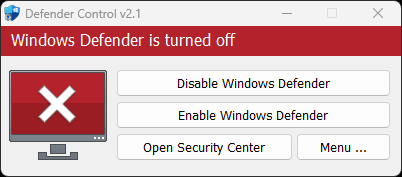
Extract the zip file and and open “DControl Download” proceed to click “Disable Windows Defender”
How do I setup Discord Overlay?
Make sure Discord Overlay is enabled
- Open Discord
- User Settings → Game Overlay
- Turn Enable in-game overlay → ON
-> Ensure LEGACY OVERLAY is disabled.
- Click the dropdown menu to reveal Registered Games and make sure the game you’re playing is added + overlay is ON [Fortnite, Apex, COD, Rust]
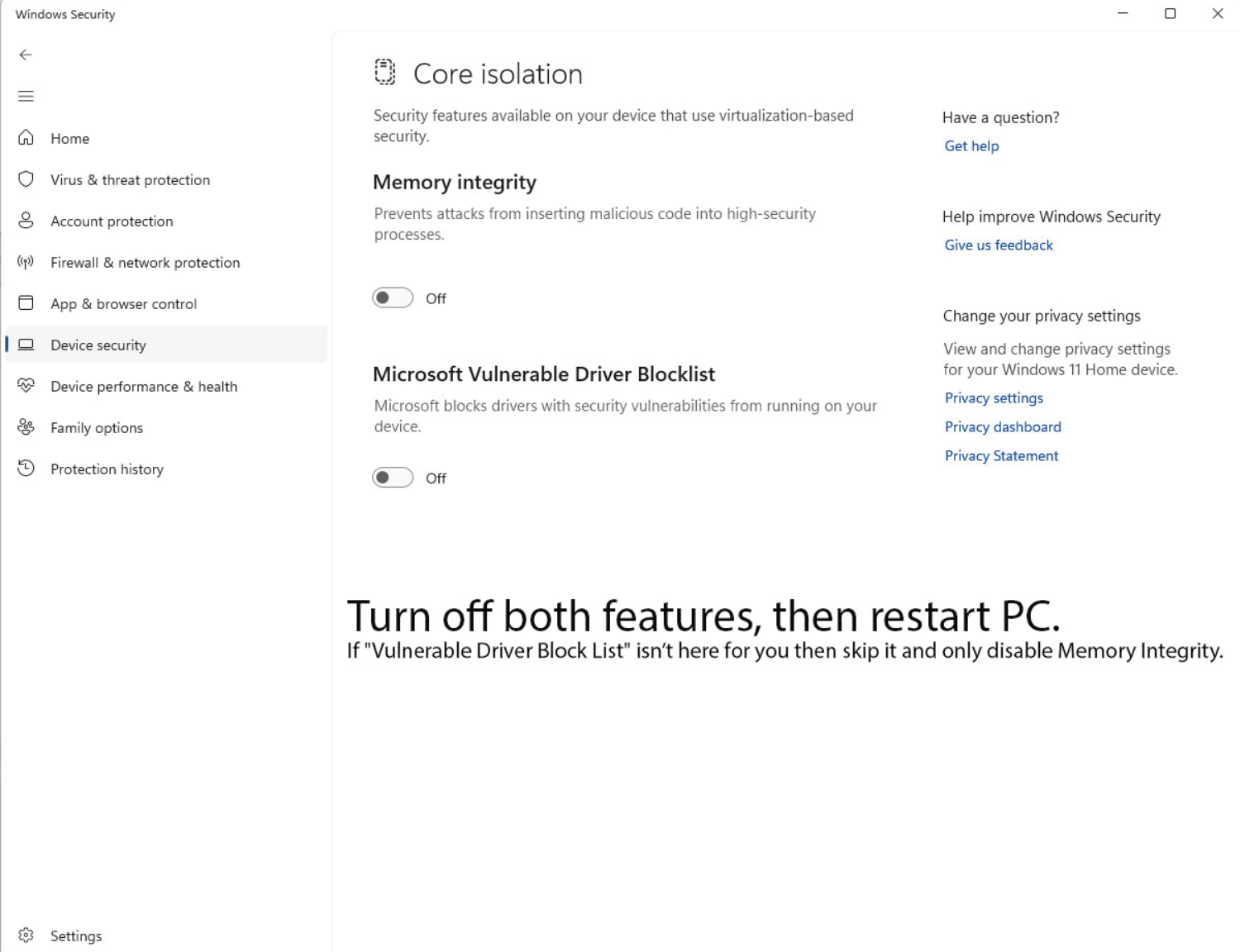
How do I disable vulnerable driver and memory integrity?
Core Isolation
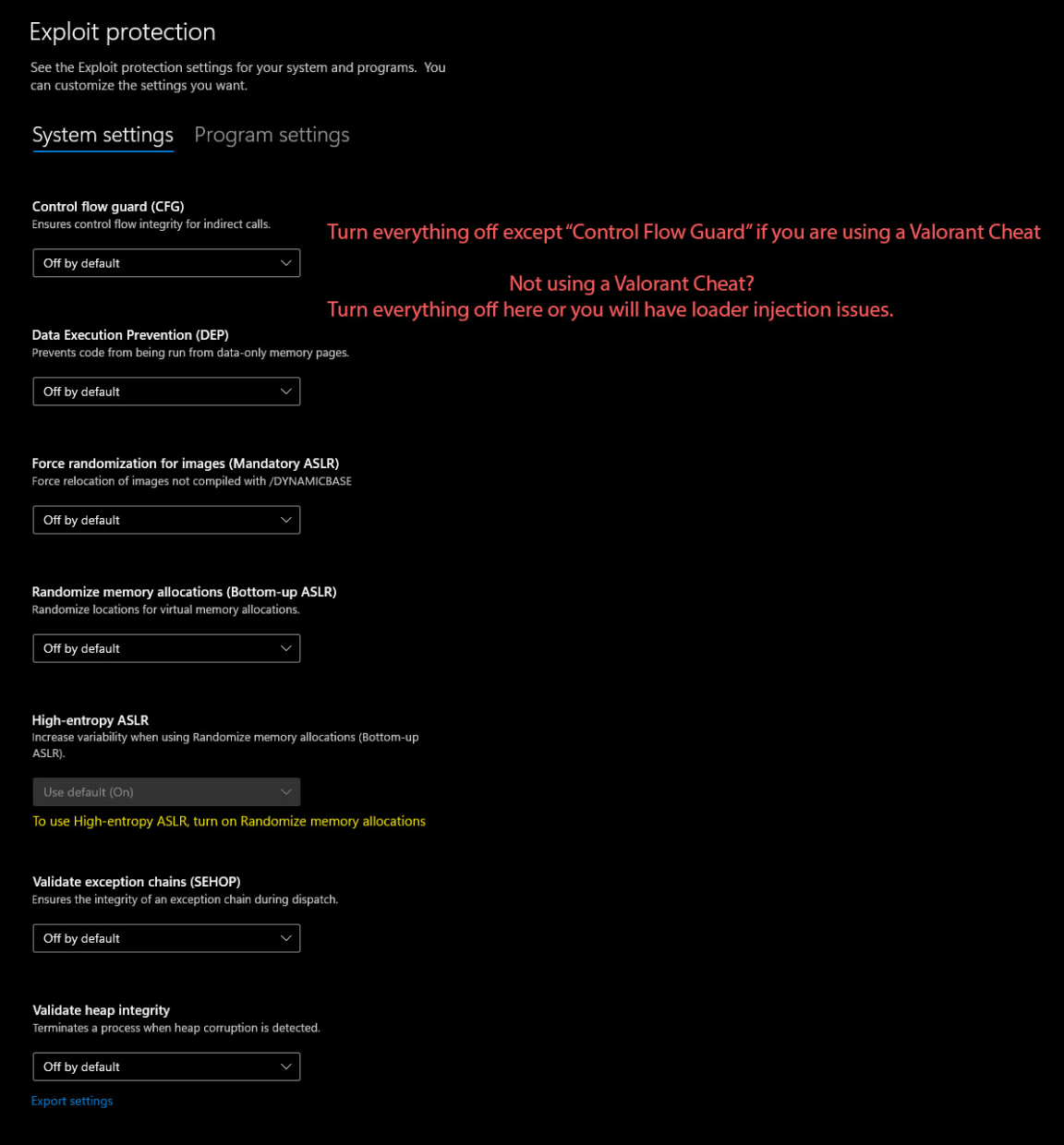
- Disable all options in Core Isolation including and Turn everything off in Exploit Protection
Riot Vanguard
- If you have Valorant installed make sure you remove Riot Vanguard unless you are planning to use a Valorant Cheat.
My Loader freezes or never opens
- Disable ALL antivirus
- Disable Hyper‑V
- Disable Core Isolation
- Disable Vulnerable Driver Blocklist
- Restart PC
- Run loader again as ADMIN
Software not injecting after pressing load
- Make sure Discord overlay is ON (NOT legacy)
- Fortnite must be in Windowed Fullscreen
- Disable all antivirus
- Disable Hyper‑V
- Restart PC
- Run loader again
- Wait 10–20 seconds (do NOT spam-click loader)
vcruntime140.dll not found error
Install Dependencies
-
Ever had the issue “vcruntime140.dll not found”? this fixes it, it usually fixes all the Loader issues.
-
DirectX Runtime Web Installer from Official Microsoft Download
Error 0xD1
According to Busan documentation:
- Run the provided utility scripts to fix vulnerable drivers
- Disable antivirus
- Disable Core Isolation
- Disable Hyper‑V
- Reboot
- Try injection again
Error 0x5010
- Restart your PC
You may need to restart multiple times.
- If it still persists:
- Disable Virtualization in BIOS/UEFI (Intel VT-x / AMD-V), then boot back into Windows.
ERROR 3
- Open a ticket immediately in https://discord.com/invite/busansu
I'm having Authentication Issues
- Use https://one.one.one.one/ If the issue still persists open a ticket in discord.gg/busansu
Game crashes on injection
- Update GPU drivers
- Disable overlays (NVIDIA, SteelSeries, Overwolf, etc.)
- Only leave Discord overlay on
- Restart computer
- Load software again
Loader window closes instantly
- Right-click → Run as Admin
- Disable SmartScreen
- Move loader to its own clean folder
- Re-extract files from the .zip
BAN INFO
Common Questions
How to know if it’s a report ban?
- Wait ur 24h out and see if it goes if it does = report ban
Will this ban expire and get removed?
- Yes, this (24-48 hour ban) will be removed, and you will be fully unbanned. Even if you received an HWID ban and there are traces of it, all traces, bans, etc., will be removed when the ban expires. NOTE: However, please refrain from raging as there is always a chance of an Epic Games developer manually banning you, which will result in a permanent ban for your account, as well as bans for your IP and HWID.
Few Tips To Avoid Manual/Report Bans
-
If someone is spectating you, avoid using aimbot. If they notice your exceptional aim, they may report you, increasing the risk of getting banned.
-
Don’t rely solely on your aim; try to have good mechanics that make you look like a pro player. This will make your aim appear more natural.
Busan Links
Website: https://busan.su
Discord: https://discord.com/invite/busansu
Docs: https://busan-su.gitbook.io/busan.su-docs/